Some time ago I wrote about instant display switching using the ATI driver for Linux.
I also mentioned I had some very annoying artefacts in the lower right corner of my screen with the drivers that are supporting OpenSUSE 10.3.
Guess what? The latest release from ATI, version 8.1, fixes all this and also (for me) improves performance a great deal. So, hop over to ATI and select your card, or click this link to download the 8.1 version directly.
Apart from the screen corruption, problems with suspend to RAM have been fixed as well. Three cheers for the ATI guys!
Showing posts with label ati. Show all posts
Showing posts with label ati. Show all posts
Wednesday, January 23, 2008


Tuesday, December 18, 2007
ATI Linux Driver: instant display switching
Today I was fooling around with my xorg configuration for my ATI Driver (I have some irritating artefacts in the right lower corner of my screen - anyone?).
When playing with aticonfig, I noticed that it lets you switch instantly from single to dual-head mode, without touching the rest of xorg, and without so much as a glitch!
I wrote a little script that now automatically switches my laptop between the LCD and a mirrored dual-head for presentation mode.
I've created a link to it on my desktop, and now I click the icon and I have my presentation mode!
Beware: always select a resolution first that is supported by both screens, otherwise you get a corrupted display (nothing serious though).
Have fun!
When playing with aticonfig, I noticed that it lets you switch instantly from single to dual-head mode, without touching the rest of xorg, and without so much as a glitch!
I wrote a little script that now automatically switches my laptop between the LCD and a mirrored dual-head for presentation mode.
#!/bin/bash
STATE=$(aticonfig --query-monitor | grep Enabled | awk -F: {'print $2'} | sed 's/\s//g' )
case "$STATE" in
lvds)
echo Switching to dual screen...
aticonfig --enable-monitor=lvds,crt1
;;
crt1,lvds)
echo Switching to single screen...
aticonfig --enable-monitor=lvds
;;
lvds,crt1)
echo Switching to single screen...
aticonfig --enable-monitor=lvds
;;
esac
I've created a link to it on my desktop, and now I click the icon and I have my presentation mode!
Beware: always select a resolution first that is supported by both screens, otherwise you get a corrupted display (nothing serious though).
Have fun!
Saturday, October 27, 2007
ATI driver update 8.42.3
8.42.3
Released on 24th October 2007
Support for X.org 7.3, Products older than Radeon(TM) 2x00 are now supported
more
Released on 24th October 2007
Support for X.org 7.3, Products older than Radeon(TM) 2x00 are now supported
more
Saturday, October 06, 2007
oneClick ATI, NVIDIA
Now that openSUSE 10.3 is all installed, Compiz users might want a handy links to 1-click NVIDIA and ATI driver installer, so here they are:


1-Click icon set thanks to FunkyPenguin’s blog. 1-click YMP(YaST MetaPackage) from Francis Giannaros posted on openSUSE wiki pages for NVIDIA and ATI.
ATI driver on openSUSE 10.3
Add the repository
sude zypper ar http://www2.ati.com/suse/10.3 atiInstall the driver
zypper in ati-fglrxG01-kmp-default x11-video-fglrxG01Backup your currect settings
cp /etc/X11/xorg.conf /etc/X11/xorg.msyLet aticonfig do the inital changes
aticonfig --initial --input=/etc/X11/xorg.confMake some manual changes to the xorg.conf, (not sure if required)
>sudo pico /etc/X11/xorg.conf
Section "Module"
Load "dbe"
Load "extmod"
Load "dri"
EndSection
Section "Device"
Driver "fglrx"
Option "KernelModuleParm" "agplock=0"
Option "UseInternalAGPGART" "no"
Option "EnablePrivateBackZ" "no"
Option "mtrr" "on"
Restart X
init 3
init 5
Computer, Control Center, Desktop Effects
Restore your original settings
Restore your xorg.confcp /etc/X11/xorg.msy /etc/X11/xorg.conf
Remove the ATI driver
rpm -e $(rpm -qa|grep fglrx)
Wednesday, September 12, 2007
Friday, September 07, 2007
ATI driver will get opensource
This is a big step for Linux, hope that Nvidia will see the light and follow.
Next week, AMD plans to provide an open source information and development package supporting the ATI Radeon™ HD 2000 series as well as ATI Radeon™ X1000 series of graphics processing units (GPU) on Linux desktops. To accelerate this initiative, AMD partnered with Novell’s SUSE Linux engineering team. Over the following months, AMD will work with the community to enable 2D, 3D and video playback acceleration to provide the best possible experience on the Linux desktop. This strategy complements and enhances AMD's existing support of the Linux community through its regularly released high performance Catalyst driver. http://www.amd.com/us-en/Corporate/VirtualPressRoom/0,,51_104_543~119372,00.htmlThursday, September 06, 2007
openSUSE 10.3 beta 3
Is available for download
changes
You only have to wait for the ATI driver 8.41 (significant graphics performance and compatibility enhancements)
"In all of the benchmarks with all of the graphics cards, the 8.41 driver was considerably faster. On average, this new driver allowed these ATI graphics cards to operate between 50% and 90% faster." - more
changes
You only have to wait for the ATI driver 8.41 (significant graphics performance and compatibility enhancements)
"In all of the benchmarks with all of the graphics cards, the 8.41 driver was considerably faster. On average, this new driver allowed these ATI graphics cards to operate between 50% and 90% faster." - more
Wednesday, August 15, 2007
New ATI driver 8.40.4
This release of the Catalyst Linux driver introduces the following new features:
TV Out Functionality
Catalyst Control Center Linux Edition
openSUSE 10.3 beta is not supported :-(
updated the myth wiki
TV Out Functionality
Catalyst Control Center Linux Edition
openSUSE 10.3 beta is not supported :-(
updated the myth wiki
Tuesday, June 26, 2007
Friday, June 01, 2007
ATI driver update 8.37.6
https://a248.e.akamai.net/f/674/9206/0/www2.ati.com/drivers/linux/linux_8.37.6.html
New Features
This release of the Catalyst® Linux graphics driver introduces the Catalyst™ Control Center version 1.0. This version of the Catalyst Control Center provides a 3D aspect page which allows for the adjustments to be made in 3D applications such as graphic-design applications, CAD applications, and games.
Resolved Issues
The following section provide a brief description of resolved issues with the latest version of the ATI Catalyst™ Linux software suite. These include:
* Logging out of a session to the graphical login manager no longer crashes the Xserver
New Features
This release of the Catalyst® Linux graphics driver introduces the Catalyst™ Control Center version 1.0. This version of the Catalyst Control Center provides a 3D aspect page which allows for the adjustments to be made in 3D applications such as graphic-design applications, CAD applications, and games.
Resolved Issues
The following section provide a brief description of resolved issues with the latest version of the ATI Catalyst™ Linux software suite. These include:
* Logging out of a session to the graphical login manager no longer crashes the Xserver
Monday, May 14, 2007
fglrx opensource?
MoxFulder writes "Henri Richard, AMD's VP of sales, has promised to deliver open-source drivers for ATI graphics cards (recently acquired by AMD) at the recent Red Hat Summit. A series of good news for proponents of open-source device drivers. In the last year, Intel, the leading provider of integrated graphics cards, has opened their drivers as well. But ATI and NVidia, the only two players in the market for high-performance discrete graphics cards, have so far released only closed-source drivers for their cards. This has created numerous compatibility, stability, and ethical problems for users of Linux and other open source OSes, and prompted projects like Nouveau to try and reverse-engineer NVidia drivers. Hopefully AMD's decision will put pressure on NVidia to release open-source drivers as well!"
Read more of this story at Slashdot.
Wednesday, April 18, 2007
New ATI driver
NEW FEATURES: (1) Linux Kernel 2.6.20 Support (2) AMD Catalyst Control Centre v0.9 adds language localization for: Arabic, Chinese (Simplified), Chinese Tranditional), Czech, Danish, Dutch, Finnish, French, German, Greek, Hebrew, Hungarian, Italian, Japanese, Korean, Norwegian, Polish, Portuguese (Brazilian), Russian, Swedish, Spanish, Thai, and Turkish. ISSUES RESOLVED: (1) In certain AGP graphics cards, the system no longer ceases to respond when switching from the X-Server display to a text console.
https://a248.e.akamai.net/f/674/9206/0/www2.ati.com/drivers/linux/linux_8.36.5.html
https://a248.e.akamai.net/f/674/9206/0/www2.ati.com/drivers/linux/linux_8.36.5.html
Tuesday, April 10, 2007
Kill ATI/AMD -9 part 2

It is so easy to say "we don't support it" http://support.ati.com/ics/support/default.asp?deptID=894&task=knowledge&questionID=26907
This excludes almost everything on linux, what's left to support?
Thursday, March 29, 2007
ATI driver update 8.35.5

Linux Proprietary Driver 8.35.5 Release
https://a248.e.akamai.net/f/674/9206/0/www2.ati.com/drivers/linux/linux_8.35.5.html
It introduces the Beta version of the AMD Catalyst Control Centre: Linux Edition to replace the FireGL Control panel.
Monday, March 26, 2007
SLED10 SP1 & ATI
8.34.8 does not seem to work with SLED10 SP1.
Bug in the (closed source) ATI driver.
Bug in the (closed source) ATI driver.
Friday, March 02, 2007
ATI driver and suspend-to-ram

It appears that a lot of people (running openSUSE 10.2) are having issues with the last releases of the proprietary ATI fglrx Linux driver in combination with suspend to RAM. Especially version 8.33.6 but also 8.32.5 seem to hang up the system in most cases.
At Moosy we wanted our beloved suspend function back and started to investigate. We found this document at AMD which simply stated: "ATI Engineering is aware of this issue and is investigating." Not very promising.
When digging deeper into this, we found a solution that may work for you. This has been tested on some Dell Latitude and IBM Thinkpad laptops and has been found to work on those. YMMV.
openSUSE powermanagement
openSUSE works with s2ram and pm-utils as a framework for suspending. See the s2ram page on the openSUSE site.
S2ram does the actual suspending and comes with several options for different machines. Pm-utils runs distro-specific scripts for preparing the system for suspend (unloading modules, etc.)
We found that adding some options to s2ram and removing some SUSE scripts from pm-utils resulted in working suspend-to-ram with the latest fglrx drivers.
Start: s2ram
First see if you can get your machine to suspend using s2ram. To do this, open a terminal and become root. Type
s2ramand hope for the best. The command comes with several options and the one that does the trick for ATI cards seems to be -m which saves and sets the VBE mode. We found that on Dell machines, the following combination works:
s2ram -f -m
while on IBM machines
s2ram -f -s -m or even s2ram -f -s -m -a 3was necessary. Experiment some, but keep the -m option. You may want to check the s2ram suggestions for you machine using
s2ram -nand checking the line starting with "Fixes".
Add s2ram options to your setup
The options that work for you need to be put into the suspend configuration. To do this, open the file /etc/pm/config as root and search for S2RAM_OPTS="". Add the options that you needed to add for your machine here, preceded by a space, like this:
S2RAM_OPTS=" -f -m"
Remove pm-utils scripts
Now the not-so-funny part: we discovered that after this, suspending still did not work! It turned out that some of the scripts that are run by pm-utils cause this. The scripts are located in /etc/pm/hooks and we needed to remove at least the cpufreq and videobios scripts. So, to do this enter
cd /etc/pm/hooksand do a
rm 80videobios 94cpufreq 99Zgrub
(the last one may not be necessary). Please note that removing these scripts may break things (like suspend to disk).
After this, reboot to ensure that the changes are picked up by the powermanagement system. If this worked for you, let us know!! We tested on Dell D810, D600 and IBM t43, t60p systems.
Thursday, February 01, 2007
NVIDIA for mythTV
We migrated our production mythTV environment from ATI to NVIDIA.
Why, THE Business case:
We had serious issues with the latest ati driver on our new kernel in combination with latest mythTV. (Read more) We had more and more downtime due to testing and research.
The WAF (wife acceptance factor) was going down and we calculated that this potentially could have a serious impact in and around the productivity of our data center.

Investment:
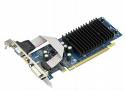
The nvidia 6200LE PCI-e is cheap. I found myself one with composite out for 20 euro's. Click here for a Google on the 6200LE.
Passively cooled card with the component out dongle
The implementation:
Took about 45 minutes in total to open the machine, disable the onboard ATI crap and to migrate from ATI drivers to NVIDIA drivers.
Why, THE Business case:
We had serious issues with the latest ati driver on our new kernel in combination with latest mythTV. (Read more) We had more and more downtime due to testing and research.
The WAF (wife acceptance factor) was going down and we calculated that this potentially could have a serious impact in and around the productivity of our data center.
Investment:
The nvidia 6200LE PCI-e is cheap. I found myself one with composite out for 20 euro's. Click here for a Google on the 6200LE.
Passively cooled card with the component out dongle
The implementation:
Took about 45 minutes in total to open the machine, disable the onboard ATI crap and to migrate from ATI drivers to NVIDIA drivers.
Monday, January 22, 2007


Saturday, January 20, 2007
kill fglrx -9
Now I'm on a new kernel with openSUSE 10.2 and a new version of myth 0.20 have some new issues:
I have had it with ATI and tv-out on Linux. Hours have gone into this crap after my upgrade.
bugs in fglrx #(@*$&(@#*$ that where not there is previous versions (*#&$# (suse 10.0, myth 0.19, fglrx 8.24 was working)
http://moosy.blogspot.com/2007/01/ati-overlay-surface-tv-out.html
Serious about putting in a NVIDIA card.
Problem is that I do not have enough space in my box
Also thinking about a Moosy campaign to boycot ATI cards, complete with banners and press releases.
I have had it with ATI and tv-out on Linux. Hours have gone into this crap after my upgrade.
bugs in fglrx #(@*$&(@#*$ that where not there is previous versions (*#&$# (suse 10.0, myth 0.19, fglrx 8.24 was working)
http://moosy.blogspot.com/2007/01/ati-overlay-surface-tv-out.html
Serious about putting in a NVIDIA card.
Problem is that I do not have enough space in my box
Also thinking about a Moosy campaign to boycot ATI cards, complete with banners and press releases.
Subscribe to:
Posts (Atom)